Advanced Chart Tools
See Relationships Others Miss
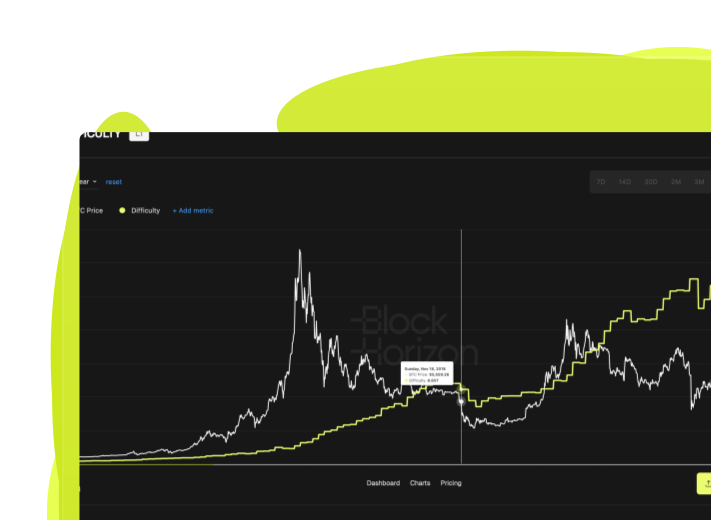
Unlock deeper insights with advanced chart features that let you compare multiple metrics, overlay moving averages, and apply color gradients to visualize hidden patterns in Bitcoin data.
.png)
What Are Advanced Chart Tools?

.png)
.png)
.png)
.png)
Why Advanced Chart Tools Matter
Uncover insights that isolated metrics hide
Identify Correlations and Divergences
Spot when price and on-chain fundamentals diverge - like when long-term holder supply increases while price drops, signaling accumulation. These signals are invisible when viewing metrics in isolation.
.avif)
Validate Investment Theses With Multiple Data Points
Test your assumptions by comparing metrics that should move together. If you believe miner stress drives price, overlay miner revenue and difficulty adjustments on the price chart to validate or refute the relationship.
.svg)
Reduce Noise and Clarify Trends
Apply moving averages to volatile on-chain metrics to filter out short-term noise and focus on structural trends. See whether holder behavior changes are temporary spikes or sustained shifts.
.svg)
How Advanced Chart Tools Work
Step 1
Select Your Primary Metric
Open any chart on BlockHorizon - whether it's price, long-term holder supply, or miner economics.
Step 2
.svg)
Apply Advanced Features
Use the chart toolbar to compare additional metrics, add moving averages (7, 14, 30, 60, 90, or 365-day periods), toggle between log and linear scale, or apply color gradients based on a third variable.
Step 3
.svg)
Analyze the Relationships
Watch how metrics move together or diverge. Identify inflection points, validate patterns, and build data-backed narratives about Bitcoin's behavior.
When to Use Advanced Chart Tools

Multi-Cycle Pattern Recognition
Long-term investors compare current holder behavior to past cycles by overlaying similar timeframes and applying moving averages to identify whether accumulation patterns match previous bull or bear markets.
.svg)
Macro and Fundamental Analysis
Portfolio managers layer price, realized cap, and long-term holder supply on the same chart to understand whether Bitcoin's current valuation aligns with fundamental holder conviction and capital flows.
.svg)
Technical Analysis With On-Chain Confirmation
Traders combine technical indicators like moving averages with on-chain metrics such as exchange flows to validate price breakouts or reversals with blockchain-backed evidence.
Technical Details
Compare metrics
Add up to 3 additional metrics on a single chart
Moving averages
SMA and EMA with custom or preset periods (7, 14, 30, 60, 90, 365 days)
Scale options
Toggle between linear and logarithmic (log) scales
Color gradients
Apply third-variable color mapping to price or metrics (where supported)
Y-axis management
Dual y-axis support for metrics with different scales
Export & access
Download comparison charts with all overlays included (Pro plan)
.png)
.png)
Ready to See Bitcoin's Full Story?
Use Advanced Chart Tools to uncover relationships and patterns hidden in isolated metrics.